website redesign, SEO guide, redirect strategy, technical SEO, organic traffic
Website Redesign for SEO: A Complete Guide
by raffiné studio

You've probably seen it happen. A business invests in a polished new site, the launch looks clean, and then the phones go quiet because organic enquiries start slipping. The design got better, but the search visibility that used to bring in steady leads didn't survive the rebuild.
That outcome isn't random. A website redesign for SEO is really a migration of discoverability, not just a visual refresh, and in Australia the context is significant because 98% of Australians aged 16+ used the internet in 2024 and 95% of households had internet access in 2022–23 (ACMA and ABS connectivity figures). When nearly everyone is online, a redesign that weakens crawlability, slows pages, or shifts URLs carelessly can affect far more of the market than many owners expect.
The sites that keep ranking usually treat SEO as part of the build, not a cleanup job after launch. That means preserving what already works, remapping what needs to change, and watching the site closely after it goes live so traffic doesn't bleed out.
Why Redesigns Can Make or Break Your Organic Traffic
A broker calls after launch because the new site looks sharper, but enquiries have gone missing. The developer says the build is complete. The designer says the brand now feels premium. Meanwhile, the pages that used to attract buyers are either gone, hidden behind new paths, or no longer easy for Google to understand.
That gap between appearance and search performance is where redesigns usually fail. Search engines don't care that the homepage feels modern if the service pages lost their metadata, the internal links became messy, or the navigation structure now buries important pages too deep to crawl efficiently. A redesign can still be a good business decision, but only if it protects the routes that already drive discovery.
Why the audience size changes the risk
In Australia, the online audience isn't a niche segment. The national connectivity figures above mean search visibility matters across a broad base of potential clients, not just a small digital-first subset. For service businesses, that makes organic search traffic, mobile usability, and form completion central business metrics, not technical vanity measures.
Practical rule: if a page brings in qualified leads now, treat it like an asset that needs protection, not like content that can be rewritten casually.
That's especially true for professional services and B2B firms, where people often arrive with intent rather than curiosity. They search a problem, compare a few options, and decide quickly which firms feel credible enough to contact. If a redesign interrupts that path, the effect can be immediate even when the visual work is excellent.
A good example is a site like the Centuria project page at Raffine Studio's portfolio, where the value of the design isn't just visual polish. The test is whether the structure still supports clarity, findability, and the next step a visitor is meant to take.
What goes wrong when SEO is an afterthought
The common pattern is simple. Teams redesign for conversion, but they don't preserve the old site's search footprint. The result is content cannibalisation, broken paths, and ranking signals that no longer point to the right pages.
That's why SEO has to be built into the timeline from day one. Once the new structure is already approved and the pages are in production, the options narrow fast. Fixing problems after launch is always possible, but it's slower, costlier, and more disruptive than preserving the site properly in the first place.
Auditing Your Current Site Before Any Changes Begin
Before a single layout changes, the current site needs to be documented in detail. Most redesign problems start with a simple blind spot, no one knows which pages matter until after they've been deleted, merged, or renamed. A proper audit gives you the map you'll need later when someone asks why a page disappeared or why a ranking slipped.
Start with a full crawl in Screaming Frog or Sitebulb. Export every indexable URL, metadata field, canonical tag, status code, and internal link relationship. Then compare that crawl with Google Search Console and GA4 so you can see which URLs already earn impressions, clicks, and conversions.
Build a baseline you can defend later
The point of the audit is not to create a giant spreadsheet for its own sake. It is to identify what must survive the redesign. If a page drives organic enquiries, it deserves a place in the migration plan even if the design team wants a cleaner menu or a slimmer service structure.
Use Google Search Console to export page-level performance data and record the pages that already earn visibility. In GA4, focus on event-based metrics such as organic sessions, form submissions, and booking completions. For Australian businesses that rely on lead capture, those events are a far better baseline than a decorative traffic snapshot, especially now that GA4 has replaced Universal Analytics as the main reporting platform for most sites.
If you can't explain which pages, queries, and actions matter before the redesign, you won't be able to tell what the rebuild actually improved after launch.
Document what can't be lost
A proper audit should capture more than traffic. It should record:
High-performing URLs, especially pages that convert or attract strong intent.
Most-linked pages, because external links are part of your authority.
Metadata and headings, since title tags and page structure often get lost during redesigns.
Technical issues, including crawl depth, broken links, thin pages, and duplicate paths.
Current form behaviour, so you know whether inquiry flows are working before new templates replace them.
It should also flag pages that are already competing with each other. I see this often on service sites, where a broad page, a suburb page, and an older blog post all target the same query set without anyone realising it. Once the redesign changes URLs or merges templates, that overlap can turn into content cannibalisation fast, especially if old versions stay live or redirects point too loosely. A digital marketer analyzing website broken links using a dashboard on a computer screen for SEO optimization.

The final output should be a pre-launch record, not just a checklist. If a developer, copywriter, and SEO consultant all work from the same baseline, the redesign stops being guesswork and becomes controlled change. That record also helps catch redirect chain accumulation before it starts, because once one old URL points to another old URL and then to the final destination, the loss is small on paper and annoying in practice.
Mapping Content and Building Redirects That Preserve Link Equity
This is the stage where many redesigns break. Pages get renamed, URLs become shorter, navigation gets simplified, and the old address that already had authority now leads nowhere useful. If the mapping isn't disciplined, you lose link equity, confuse users, and create duplicate content problems at the same time.
A 1:1 redirect map is the simplest reliable defence. Every old URL should either resolve to an equivalent new URL or be retired intentionally with a clear reason. The strongest migrations are boring in this respect, because they preserve continuity rather than trying to be clever.
Decide what stays, merges, or disappears
Content mapping starts with three decisions. Keep the page, merge it, or retire it. That sounds blunt, but it's better than letting the design dictate the content structure by accident.
A buyers agency might have separate pages for different service types, suburbs, or client segments. A broker might have distinct pages for home loans, refinancing, and investor lending. If those are collapsed into one broad service page without a plan, the site can end up competing against itself or losing the specific intent that used to bring in qualified visits.
The main risk here is content cannibalisation from URL changes. If two old pages get merged into one new page without clear consolidation, or if both old and new versions remain accessible, search engines can split signals between them. That usually leads to weaker rankings, not stronger ones.
Build redirects as a living asset
Your redirect spreadsheet shouldn't be a one-time list. It should contain the old URL, the destination URL, the content reason for the change, and a status field for implementation. A good sheet is the difference between a controlled migration and a guessing game once development is underway.
Use these rules:
Map equivalent pages directly, even if the new URL is cleaner.
Merge overlapping pages carefully, then point all old variants to the consolidated page.
Avoid redirect chains, because each extra hop adds risk and makes troubleshooting harder.
Retire pages deliberately, instead of leaving them to return 404s by accident.
The reason chain reduction matters is simple. If the old page redirects to a temporary path, and that path later redirects again, you've created more room for failure. Search engines may still find the content eventually, but the process is less efficient and harder to debug.
A clean map also helps developers implement redirects in a structured way rather than improvising them after launch. The more your architecture changes, the more valuable that spreadsheet becomes.
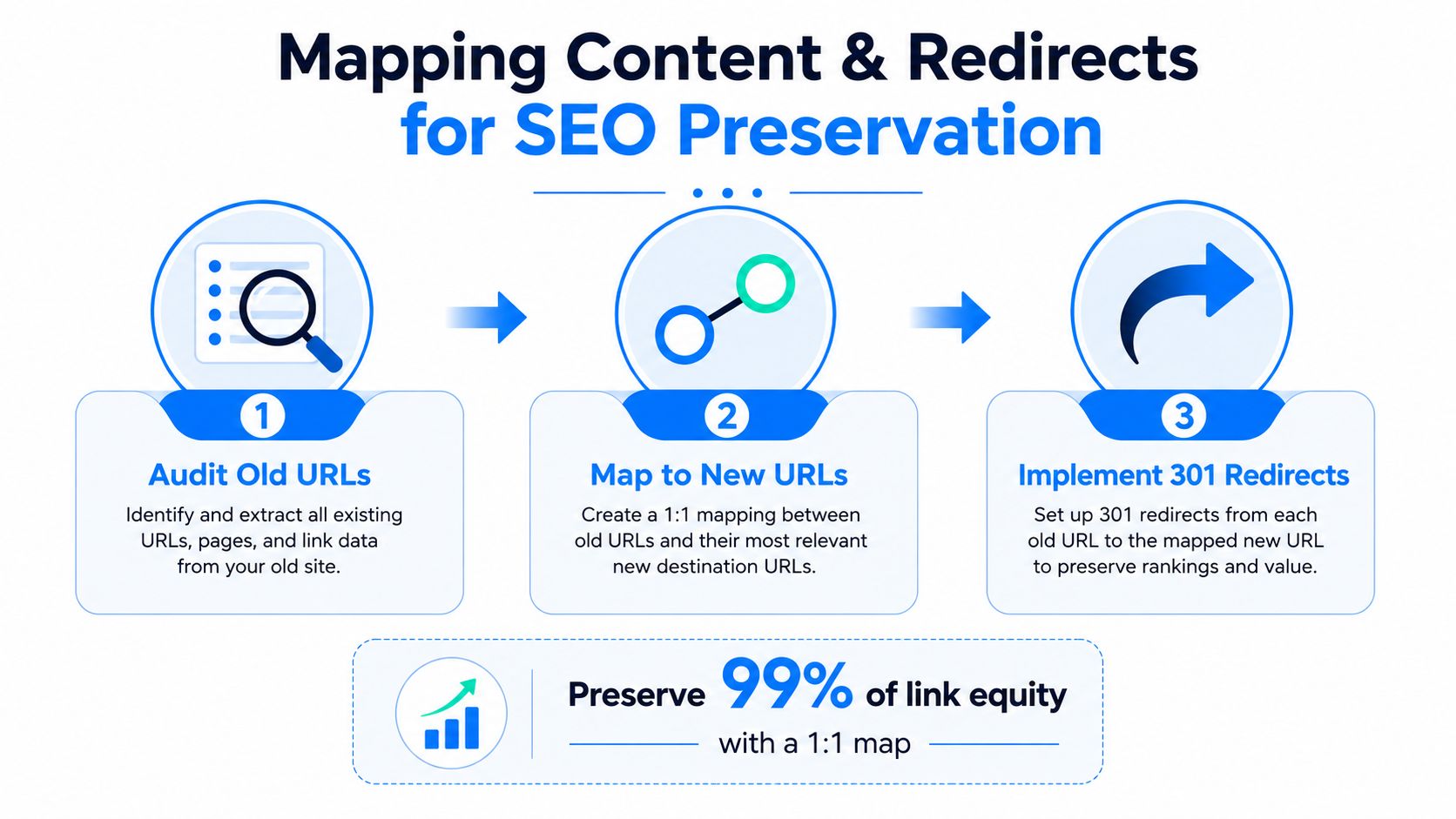
A clean content map is not about preserving every old page forever. It's about preserving the value of the pages that earned trust while removing the structural clutter that used to hide them.
Building Technical SEO Into the Redesign Development Process
Once development starts, SEO decisions are no longer theoretical. They're being encoded into templates, navigation, templates, and page logic whether anyone notices or not. That's why the build phase needs technical review at the same pace as design sign-off.
Start with the architecture. URLs should be readable and consistent, but they also need to reflect the site's actual hierarchy so Google can interpret the relationships between pages. If a service page sits three levels deep just to fit the brand's preferred menu style, you've made crawling harder for no real gain.
What the developer has to build from day one
There are a few technical choices that should be handled before launch, not patched later:
Schema markup, so page meaning is explicit from the start.
XML sitemap structure, so the final architecture is reflected accurately.
Internal linking patterns, so important pages are reachable without detours.
Mobile-first templates, because redesigns must work for the way people browse.
Core Web Vitals awareness, because a beautiful page that loads badly still underperforms.
These items aren't separate from SEO. They are SEO. A site can't rank consistently if the page templates make it hard to interpret content, the sitemaps are stale, or the mobile layout hides the main CTA.
The Australian audience size matters here too. Since the addressable market is so broad, poor mobile usability isn't a minor inconvenience, it's a reach problem. A redesign that feels refined on desktop but frustrates mobile visitors can erode discovery just when the site should be making first impressions easier.
Don't bolt SEO onto the end
The most common mistake is treating SEO as a post-build review. By then, the templates are locked, the content is entered, and the developer is reluctant to rework components that are already live in staging. That's where small issues become entrenched.
I'd rather see a slightly delayed launch than a fast launch with broken structure. A redesign that includes the right search foundations from the start has a much better chance of keeping its rankings because the site is built to be understood, not just admired.
For teams that are also thinking about broader visibility changes, including AI search and answer-engine behaviour, the thinking should stay consistent with the same structural discipline outlined in Raffine Studio's notes on generative engine optimisation-matters). The principle is the same, clear information architecture wins.
A technically sound build doesn't guarantee growth, but it removes the easy ways a redesign can fail before it ever gets a fair chance.
Testing the Redesign Before It Goes Live
Launch day should feel uneventful. If you're finding broken canonicals, blocked folders, or dead internal links after the DNS switch, the testing window was too short. The staging site needs to be checked as if Google and real visitors were already using it, because that is the easiest way to catch the problems that usually get missed until rankings start slipping.
Start with redirects. Every old URL in your map should be tested against its new destination, and the response should be direct and final. No chains, no loops, and no soft-landing pages that look valid but dilute the signal. I have seen more redesigns lose ground from messy redirect paths than from poor design choices.
The pre-launch checks that catch the expensive mistakes
A practical staging checklist should include:
Canonical tags, confirmed on key page templates.
Robots.txt, checked so it doesn't block important sections.
XML sitemap submission, using the final live structure.
Internal links, verified to point to the new live URLs.
Meta titles and descriptions, copied across accurately.
Search Console URL inspection, used to confirm indexability.
Mobile usability, checked on real devices, not just a responsive emulator.
Page speed, reviewed on the pages that matter most.
Each of those checks prevents a different kind of launch failure. A noindex tag left behind can suppress visibility completely. A robots file can block the wrong paths. Bad internal linking can strand important pages out of crawl reach, and missing metadata can weaken click-through performance even if the pages still rank. The trade-off is simple, a cleaner visual redesign is not worth much if the search signals are damaged in the process.
Launch testing is cheaper than damage control. Every issue you catch on staging is one less problem to diagnose under live traffic pressure.
Make GA4 part of the launch test
Tracking needs just as much attention as indexing. GA4 should be verified before launch, so form submissions, booking events, and other lead actions fire properly the moment the new site goes live. If the tags do not work from day one, your baseline disappears and the next reporting cycle turns into guesswork.
Teams often assume the tracking agency will catch this. Sometimes they do, sometimes the launch happens before the final verification pass. That is why the checklist has to be owned, not assumed, and why a redesign review should cover both search visibility and measurement setup at the same time.
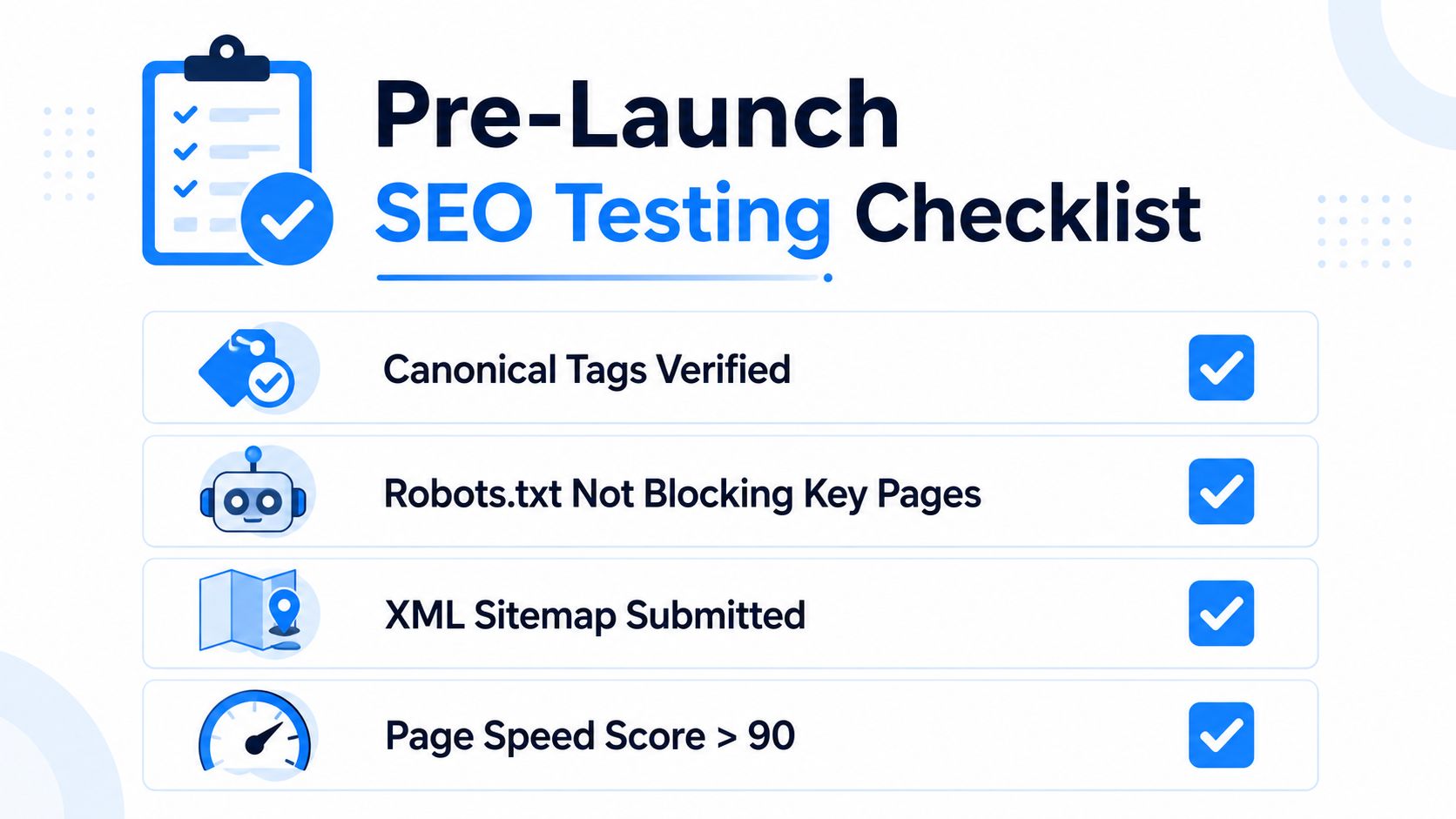
A clean launch does not mean every metric rises straight away. It means the new site is giving search engines and users the right signals from the first minute.
Monitoring Performance and Recovering from Post-Launch Issues
The first weeks after launch are where silent losses happen. Not dramatic outages, just small drifts, one broken redirect here, a lost page there, a few queries slipping down the page while everyone is focused on design praise. The redesign is only stable when the live data matches the baseline you documented before the rebuild.
Check Google Search Console daily at first. Focus on index coverage, page indexing changes, and any sudden rise in errors or excluded pages. Then compare those signals against the redirect map and crawl data so you can tell whether the issue is technical, structural, or content-related.
What to look for when traffic starts moving
The first warning signs are usually practical, not mysterious. A service page that used to rank may no longer appear in search. A redirected URL may be landing on the wrong destination. A form may still work visually but fail to send a GA4 event.
When the site dips, sort the problem into one of three buckets:
Missing or deindexed pages, which usually point to migration mistakes.
Redirect issues, including loops, chains, and poor destination matching.
Content or relevance drift, where the new page doesn't satisfy the same intent as the old one.
That framework stops teams from overreacting to every small fluctuation. Not every movement means the redesign failed, but any meaningful drop needs a cause, not a shrug.
Use the baseline, not the old homepage feel
Aesthetics can be deceptive after launch. Stakeholders often react to the site's look and feel, while the issue is whether the organic path still works. That's why the pre-launch crawl, Search Console export, and GA4 event baseline matter so much.
If a page has dropped, compare the old and new versions side by side. Check whether the URL changed, whether the redirect is clean, whether the title tag survived, and whether internal links still point to the right destination. If the problem is deeper, escalate quickly rather than waiting for “Google to settle”.
I've seen teams wait too long because the new site looked too polished to be at fault. That delay is expensive. Search losses that are diagnosed early are usually recoverable. Losses that linger for weeks can become part of the new normal.
For a good example of why the broader site system matters, not just the homepage polish, the branding and structure discussion at Raffine Studio's branding and web design page is a useful reminder that visual identity and site architecture need to support each other, not compete.
The monitoring phase is where a redesign proves whether it was a true SEO upgrade or just a fresh coat of paint. If the site still drives qualified traffic, the migration worked. If not, the evidence is usually already in the first few reports.
Turning Your Redesign Into a Lasting SEO Asset
A good redesign doesn't end when the templates go live. It becomes the structure you use for the next stage of growth. Once the site is stable, the job shifts to building around the new architecture instead of treating it as finished.
That means publishing content that fits the new page hierarchy, not fighting it. Service pages, supporting articles, and conversion pages should all reinforce the same topical structure so the site grows in a deliberate direction. If the architecture is clear, the content calendar becomes easier to plan and easier to connect to business outcomes.
Make the new site do more than look current
The most useful redesigns create a better path from discovery to action. That includes clearer booking flows, stronger integration between site pages and social content, and tighter CRM handoff so qualified leads don't get lost after submission. Those operational pieces matter because organic traffic only becomes valuable when the inquiry path is friction-light.
A well-designed site also gives you a cleaner base for future updates. New pages can be added without creating a mess of duplicate intent, and old pages can be refreshed without breaking the whole structure. That reduces the chance that the site will drift back into the same technical clutter that made the redesign necessary.
The best redesigns don't just protect rankings. They make the next 12 months of SEO easier to execute.
The sequence stays the same, even in later updates. Audit first. Map content carefully. Build technical SEO into the templates. Test before launch. Monitor after launch. That's the difference between a redesign that loses authority and one that becomes the backbone of lead generation.
If you're planning a rebuild and want the new site to protect existing rankings while improving the way enquiries come in, Raffine Studio can help you treat SEO, messaging, and conversion as one system. Visit Raffine Studio to see how a redesign can be built around search visibility, booking flow, and qualified lead generation from day one.