custom website redesign, website redesign strategy, conversion-focused design, lead generation website, website redesign process
Custom Website Redesign: A Strategic Guide for 2026
by raffiné studio

A custom website redesign shouldn't start with colours, moodboards, or a prettier homepage. It should start with a harder question, what part of the business is this site meant to move? If the answer is enquiries, booked calls, or qualified leads, then the redesign is a commercial project, not a visual refresh.
That's where most briefs go wrong. They ask a designer to make the site look current, then act surprised when the phone doesn't ring more often. The better approach is to redesign the site as lead-generation infrastructure, with clear conversion paths, tracking, and a way to prove whether the new site performs better after launch.
Why Most Website Redesigns Fail to Generate More Leads
The common mistake is treating a redesign like a brand polish. The site gets a cleaner layout, nicer imagery, maybe sharper typography, but the underlying journey from visitor to enquiry stays fuzzy. If the pages still don't move people toward a booking or a contact form, the business has paid for presentation, not pipeline.
The economic case for a custom website redesign is strongest when the site is built around measurable lead paths. That matters in Australia because the ABS reported that 10.3% of Australian businesses had an online sales channel in 2021–22, up from 8.7% in 2019–20 (ABS business data). More firms are using digital channels as a revenue path, which means the website has to do more than look credible.
A second failure point is starting without a single primary KPI. If the team can't agree whether success means form submissions, booked consults, calls, or completed applications, every design decision becomes subjective. Redesigns drift, and the site ends up serving too many masters at once.
Practical rule: if a page doesn't push a visitor toward the next commercial step, it's decorative content, not conversion architecture.
What usually gets missed
HubSpot's redesign summary shows that designers most often cite low conversion rate, high bounce rate, and better UX as reasons for redesigning a site (HubSpot web redesign stats). That lines up with what businesses feel internally, the site looks dated, but the problem is usually friction in the discovery-to-contact journey.
For Australian service businesses, that journey often ends in a call, a booking, or an enquiry rather than a cart. So the redesign brief needs to define:
The primary conversion event. One main action, not five competing ones.
The lead path. Which pages educate, which pages persuade, and which page closes.
The measurement plan. How you'll know a lead came from the redesign, not from guesswork.
HubSpot also notes that a full redesign typically takes three to six months on average (HubSpot web redesign stats). That timeline is a useful reminder that this is an operational change, not a cosmetic sprint. Launch day is only meaningful if the site can be measured properly the moment it goes live.
Discovery and Commercial Audit Before Any Design Work
A redesign that starts with visual preferences usually wastes time. The first question is commercial: what generates qualified enquiries now, where does traffic fall away, and which parts of the current site create friction for high-value prospects? If those answers are unclear, the project will be guided by taste instead of evidence.
The audit needs to treat the website as part of the revenue process. Review traffic quality, enquiry sources, page performance, and the gap between what the firm sells and what the site says. Separate stakeholder opinion from user behaviour, because partners and directors often point to “the homepage” while the core issue sits in a service page, a form, or the mobile menu.
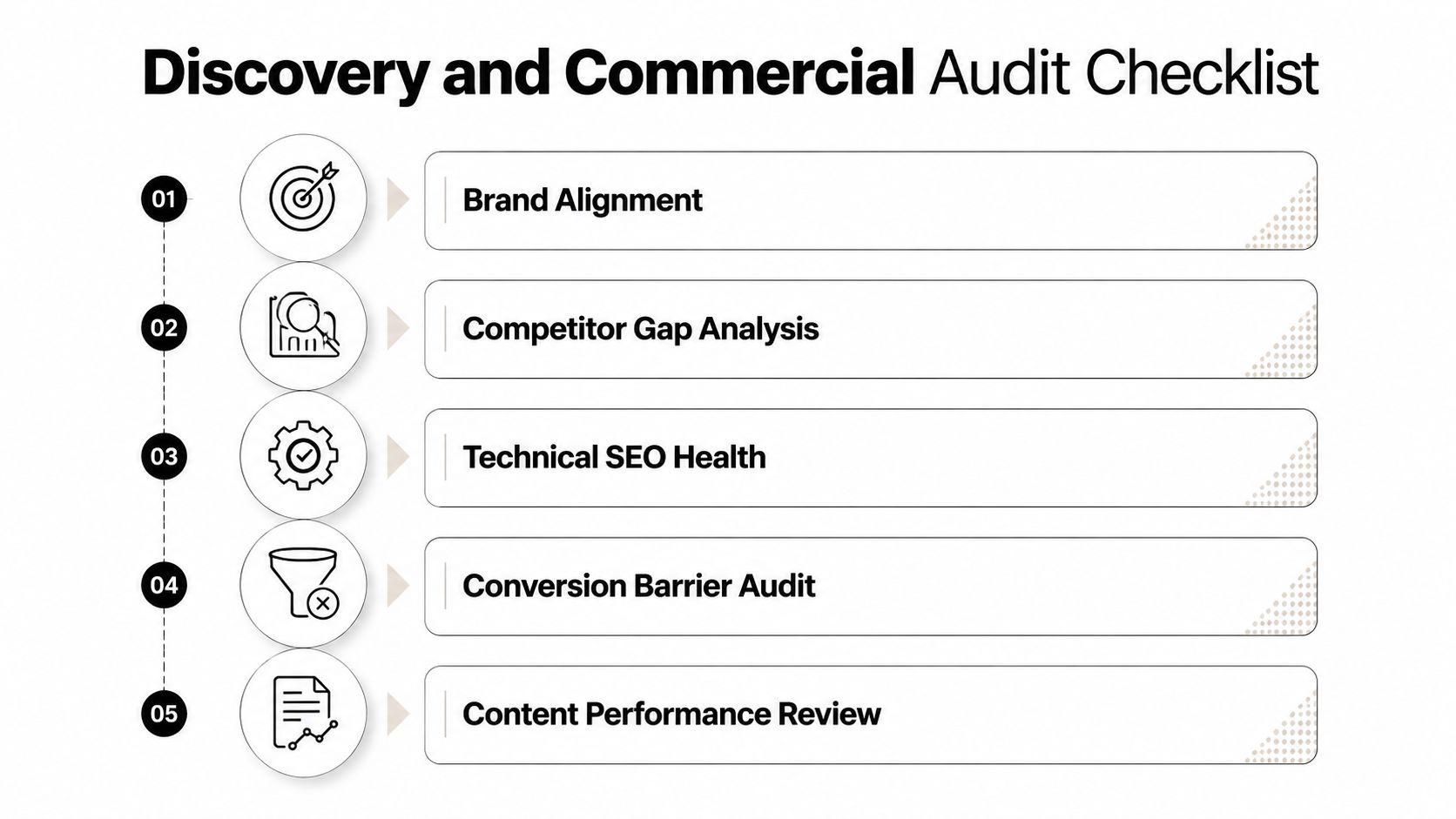
The questions worth asking
A useful commercial audit keeps the discussion direct. Who is the ideal lead? What prompts that person to enquire? Which pages carry the most weight? Where do visitors drop out? The goal is not a long report for the shelf. It is to isolate the few friction points that affect enquiry volume and lead quality.
A redesign brief that does not name the primary conversion event is usually a branding exercise in disguise.
The safest benchmark is your own qualified-lead data. For a lead-generation site, establish the current conversion baseline from real enquiry and pipeline records, then measure the redesign against that. A broad benchmark can be helpful for orientation, but it should never override the firm's own numbers or the way its buyers behave.
The requirements document that stops chaos
A strong requirements document should cover the sitemap, page purpose, calls to action, content ownership, integrations, analytics and tracking needs, SEO and redirect requirements, constraints, and approval process (requirements checklist). It should also include 301 redirect mapping, mobile-first performance checks, platform or CMS decisions, CRM integration, and an events plan (website redesign requirements).
That may sound procedural, but it is what keeps the project commercially honest. If no one owns the content, pages slip. If no one owns redirects, search equity gets lost. If no one owns tracking, the business launches without a clear view of which pages are producing enquiries and which are not.
A good discovery phase leaves the team with one thing, a written definition of what the site must achieve commercially, and how success will be measured once the new version goes live.
Information Architecture and Conversion Pathway Design
Once the audit is clear, structure becomes the main design decision. For professional services firms, the site usually isn't selling a product in a straight line. It is moving someone from uncertainty to trust, then from trust to a conversation.
That means the navigation has to do less, not more. Visitors should not have to guess where to go for the core service, the proof, the process, or the next step. On mobile especially, every extra tap adds friction, and every unclear label slows the decision.
Australian usage patterns make that hard to ignore. DataReportal's Australia report showed that at the start of 2025, 98.9% of Australians used the internet and 47.1 million mobile connections were active in a country of about 26.9 million people. Separately, StatCounter data cited by WPBeginner found that in the second quarter of 2025, mobile devices generated 62.54% of global web traffic (mobile web traffic data). For a buyer-facing firm, that means mobile structure is the baseline, not a nice-to-have.
Build the site around decision stages
A clean information architecture usually maps to three stages.
Homepage and core pages. These should answer who you help, what you do, and why someone should care.
Service pages. These pages carry the detail, proof, and objections that move a prospect closer to action.
Contact or booking flow. This should be short, obvious, and easy to complete on mobile.
That structure matters even more for brokers, buyers agents, law firms, accountants, and B2B service businesses, where the conversion event is often a conversation. You are not optimising for checkout friction. You are reducing hesitation.
A practical mapping method makes that structure commercially accountable. Assign one primary CTA and one tracked event to each service page, then record the page-to-booking path in analytics so you can see which services produce enquiries, which pages drop off, and which routes lead to qualified conversations. Without that mapping, the site can still look organised while the pipeline remains opaque.
The reason this also helps AI search visibility is simple. Clear service pages, clean entity language, and obvious page purpose make the site easier for both humans and answer engines to interpret. If the pages are vague, the site feels polished but unreadable.
Plain truth: if a visitor cannot tell what page to click next within a few seconds, the architecture is costing you enquiries.
For Raffine Studio, a redesign starts to look like a system rather than a skin. The site structure, calls to action, and booking flow need to point in the same direction. Done properly, the site gives visitors fewer decisions to make and gives the business a clearer line from page view to booked call.
A good test is to walk the journey yourself on a phone. Can you find the main service in one move, understand the offer in one glance, and contact the business without hunting through the menu? If not, the information architecture still needs work.
Visual Design, Development and Quality Assurance
The build phase works better when design, development, and QA are run as one workflow. Too many teams approve polished screens, then discover the implementation has damaged speed, tracking, or mobile behaviour. By that stage, the project has already been steered toward appearance over commercial results.
Design concepts need to be judged against the primary KPI, not personal taste. If a layout looks polished but hides the enquiry button, weakens proof, or forces unnecessary scrolling, it is not helping the business. The key question is whether the page makes the desired action easier for the right visitor.
Development decisions carry the same weight. Google's Core Web Vitals guidance uses Interaction to Next Paint (INP) and recommends benchmark values under 200 milliseconds for a good user experience (Core Web Vitals guidance). Before a redesign changes anything, the team should set a baseline so post-launch performance can be compared against real starting conditions, rather than guessed from a fresh template.
For the relationship between brand systems and web execution, see Raffine Studio's guide to branding and web design.
What QA should test
QA should go well beyond browser checks. It needs to mirror real user scenarios, especially the ones that affect enquiries and booked calls.
Forms and bookings. Test every enquiry path end to end, including confirmation and follow-up.
CRM handoff. Make sure submissions land where they should, with no gaps in data.
Mobile flow. Check that menus, buttons, forms, and sticky actions work on smaller screens.
Tracking events. Confirm that the actions you care about are being recorded.
A lot of teams also miss the integration layer. If the form works visually but the lead never reaches the CRM, the redesign has created invisible failure. If the form works but the event tracking is broken, you have lost the ability to prove value and attribute pipeline back to the new site.
One sensible option is to align the redesign with a conversion-focused build partner that can handle design, tracking, and follow-up as one system. Raffine Studio works in that space, alongside other specialists in the market. The point is the workflow, not the label.
For service businesses, the commercial takeaway is direct. Beautiful design that slows the site down or breaks tracking is a business problem, not a design achievement.
Launch Execution and SEO Preservation Checklist
Launch is where redesigns either protect the site's existing value or potentially damage it. The biggest risk isn't the homepage mock-up. It's broken redirects, missing tracking, or a CRM handoff that fails after the first few live enquiries.
The launch checklist should start with 301 redirect mapping for old URLs. If pages are changing, those paths need a clean destination so visitors and search engines don't fall into dead ends. It also needs a pre-launch crawl, sitemap review, robots.txt validation, and a page speed baseline, because those are the mechanics that prevent hidden launch issues from turning into lost traffic.
The go-no-go checks that matter
Before the new site goes live, confirm four things. The redirects are mapped. The analytics events fire properly. The forms route into the CRM. The mobile experience still works under real conditions, not just on a desktop preview.
A practical redesign checklist should also include content ownership and review workflow, platform or CMS choice, integrations such as CRM and analytics, and a tracking-and-events plan (website redesign requirements). That's the operational side of launch, and it's usually where small oversights become expensive.
Don't let launch become a visual approval meeting. Launch is a technical and commercial checkpoint.
For a deeper view on preserving organic visibility, the site should also follow a defined SEO migration process. A practical discussion of that sits in Raffine Studio's own website redesign for SEO article, which is the right companion reading when the redesign will alter URLs, page hierarchy, or content structure.
The true test after launch is whether the site still behaves like a lead system. If search traffic drops, forms fail, or lead alerts go missing, the redesign hasn't finished. It's only moved the problem into production.
Measuring Redesign ROI and Post-Launch Pipeline Attribution
The question most redesign guides avoid is the one founders care about. Did the new site create more business? Without a measurement plan, you cannot separate genuine improvement from short-term noise, seasonal movement, or a temporary spike from launch attention.
The best approach is disciplined, not theatrical. Use one primary conversion event, keep the user experience controlled, and run the old and new versions in parallel with clean randomisation and a preset sample size (Statsig redesign testing guidance). That makes it possible to attribute lift to the redesign itself instead of relying on gut feel.
What to track after launch
A useful reporting set should focus on outcomes that matter commercially.
Qualified leads. Track lead quality, not just lead volume.
Booked discovery calls. For many service firms, this is the clearest signal that the site is attracting real prospects.
Conversion rate. Compare it against the pre-redesign baseline and treat common lead-gen benchmarks as context, not targets.
Pipeline attribution. Record which pages, campaigns, and paths created the lead, then follow that through to opportunity value.
You can also use general redesign ROI guidance as a reference point when you review movement after launch. Well-run redesigns often show improvement over the first few months, but professional-services results should be judged against your own funnel, sales cycle, and lead quality rather than a generic benchmark. A site that produces more form fills but weaker enquiries has not improved the business.
The clearest way to measure post-launch impact is to connect the website to the CRM and preserve the chain from source to revenue. Record source, landing page, CTA event, booked call, qualification status, and resulting pipeline value in the CRM. That gives you a practical view of whether the redesign is creating usable demand or just moving clicks around.
A good measurement setup also needs post-launch reporting that ties site behaviour to lead follow-up. That is where automation matters. Raffine Studio's automated system examples show how the website should feed the rest of the process, because the form submission is only the start. The lead has to be routed, tagged, and handled properly if the redesign is going to translate into revenue.
If the redesign improves enquiries but the sales team does not respond well, the business still will not feel the gain. If enquiries rise and booked calls rise, the redesign has done its job. That is the standard worth holding.