seo web design, conversion focused, lead generation, ai search visibility, australian business
SEO & Web Design: Build a Site That Wins Clicks and Converts
by raffiné studio

A founder checks the dashboard on a Monday morning. Organic sessions are healthy, several service pages rank well, and the agency is reporting “strong visibility”. Yet the phone isn't ringing, the booking calendar is quiet, and the contact form produces the occasional low-quality enquiry.
That isn't a traffic problem. It's a seo & web design problem.
Your website is being treated as two separate projects, one for attracting clicks and another for making the brand look credible. In practice, a prospective client experiences one page, on one device, during one decision. They search in Google or ask an AI assistant, land on your site, decide whether they trust you, and either book a conversation or leave. Every layer has to support that journey.
Why Your Traffic Is Up but Your Enquiries Are Flat
A Sydney professional services founder recently described the situation perfectly. Their website had been rebuilt with polished photography, animated transitions and a library of service pages. Search traffic had improved, but qualified calls hadn't. Visitors could find the firm. They couldn't quickly understand who it helped, what made the offer relevant, or how to start a conversation.
That distinction matters. Visibility creates an opportunity. It doesn't create a booking. If a visitor has to interpret a vague headline, hunt for contact details, compare several competing buttons and complete an unnecessarily long form, the site is charging you for every click it fails to convert.
The structural disconnect
Most underperforming service websites have one of three problems:
The search promise doesn't match the landing page: The result says “buyers agent in Sydney”, but the page opens with an abstract brand statement.
The page answers the wrong questions: It explains the business, but not the client's situation, process, suitability or next step.
The booking path is treated as an afterthought: The call to action appears only after a long page, while mobile visitors scroll through decorative sections before finding it.
Better copy can help, but copy alone won't repair a fragmented journey. The page architecture, mobile layout, trust proof, form design, calendar and follow-up process all influence whether a qualified visitor moves forward.
Commercial rule: Don't measure SEO success at the click. Measure how efficiently the right visitor reaches a confirmed conversation.
For a law firm, that may mean a clear path from a matter-specific service page to an initial consultation request. For an accountant, it may mean separating business advisory, tax and bookkeeping journeys rather than sending every visitor to one generic contact page. For a property business, it could mean connecting suburb-level search intent to a qualification step before the discovery call.
The strongest redesigns don't ask, “How do we get more traffic?” They ask, “What must happen between a search result and a booked call?” That question changes what gets designed, written, measured and automated.
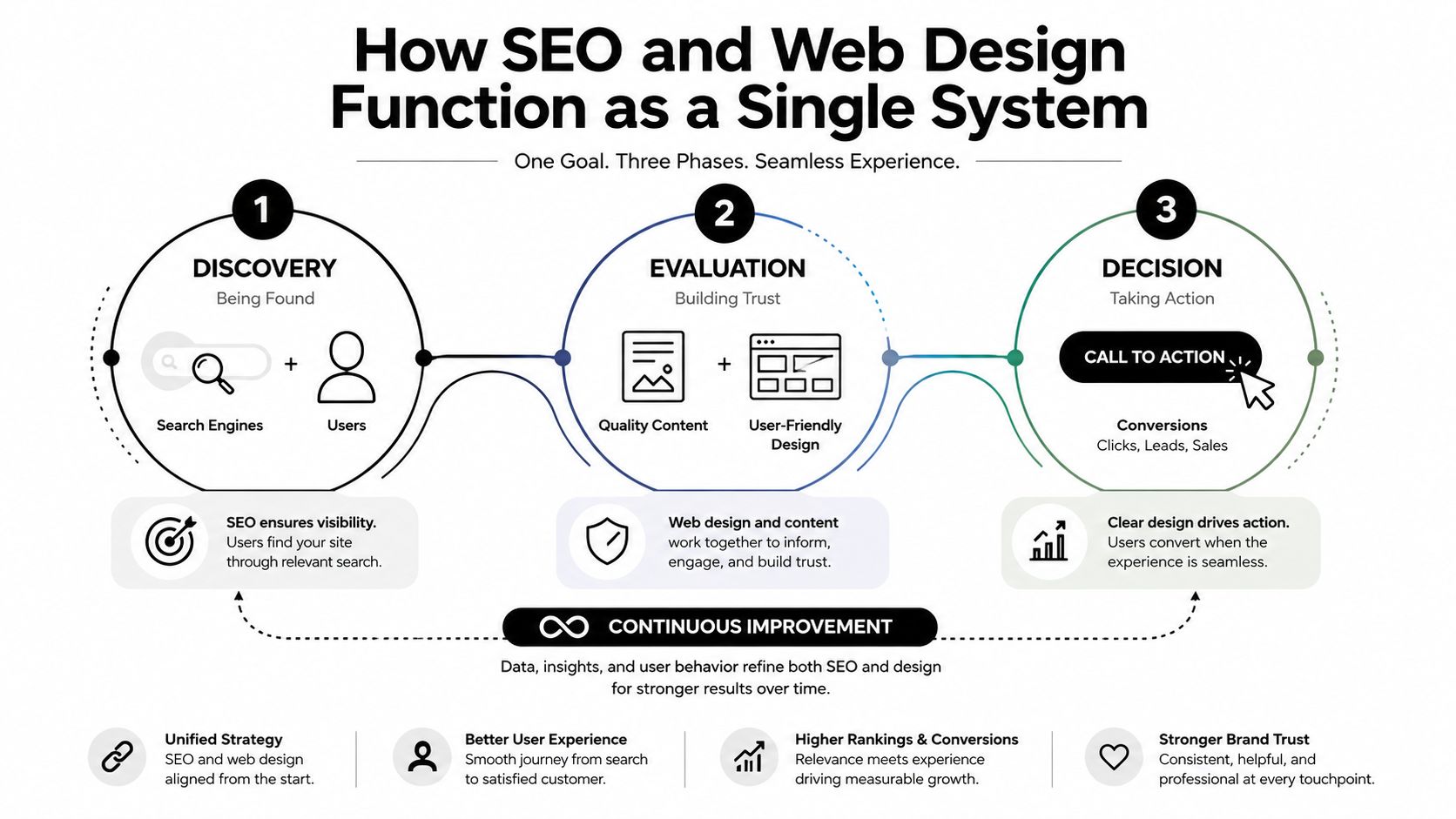
How SEO and Web Design Function as a Single System
A qualified visitor should be able to move from a Google result, ChatGPT recommendation or Perplexity answer to a confirmed discovery call in three clicks or fewer. That outcome depends on one system, not separate SEO and design tasks. Search engines must crawl the page, people must understand the offer quickly, and AI assistants must find clear information about the business, services and locations.
Australian search behaviour makes this a commercial decision. Statcounter's July 2026 Australian search data records Google at 88.22% of search market share, Bing at 8.74%, Yahoo! at 1.61% and DuckDuckGo at 0.93%. Google remains the main discovery channel, while the shift from 93.67% in August 2024 to the high-80s by mid-2026 shows why your site should also present clear entities and structured information beyond one search engine.
Build the architecture around the booking decision. Descriptive navigation, specific headings, relevant internal links, service schema and consistent business details help crawlers, answer engines and prospective clients follow the same route. A service page should make the offer obvious, prove suitability, answer key objections and place the booking action within easy reach.
Mobile is the commercial baseline
Adobe reports that mobile devices account for around 70% of traffic and that mobile design and optimisation increased site speed and performance by 19% in its Australian benchmark. Adobe's Australian web performance discussion supports a clear recommendation: design the mobile journey first, rather than compressing a desktop layout.
The opening mobile view needs a readable promise, visible service context, credible proof and an obvious booking action. Responsive breakpoints must preserve hierarchy. Compress images, prevent layout shifts and remove scripts that delay the first useful interaction.
The ACCC measures Australian web performance through average page-load timing across eight popular Australian-based webpages. Its earlier testing found that download speed did not significantly affect browsing performance. Focus on the parts your front end controls, including render-blocking resources, oversized images and unnecessary client-side overhead. The ACCC broadband performance data provides the Australian context.
SEO earns the visit. Design clarifies the decision. The booking system records intent and turns it into a confirmed conversation. When those functions are planned together, schema, entity clarity and speed support revenue instead of existing as isolated technical tasks.
Design Choices That Quietly Kill Your Rankings and Conversions
A website can look expensive and still perform like a brochure nobody reads. The most damaging decisions often appear sensible during a design review because they prioritise visual impact over comprehension, crawlability or action.
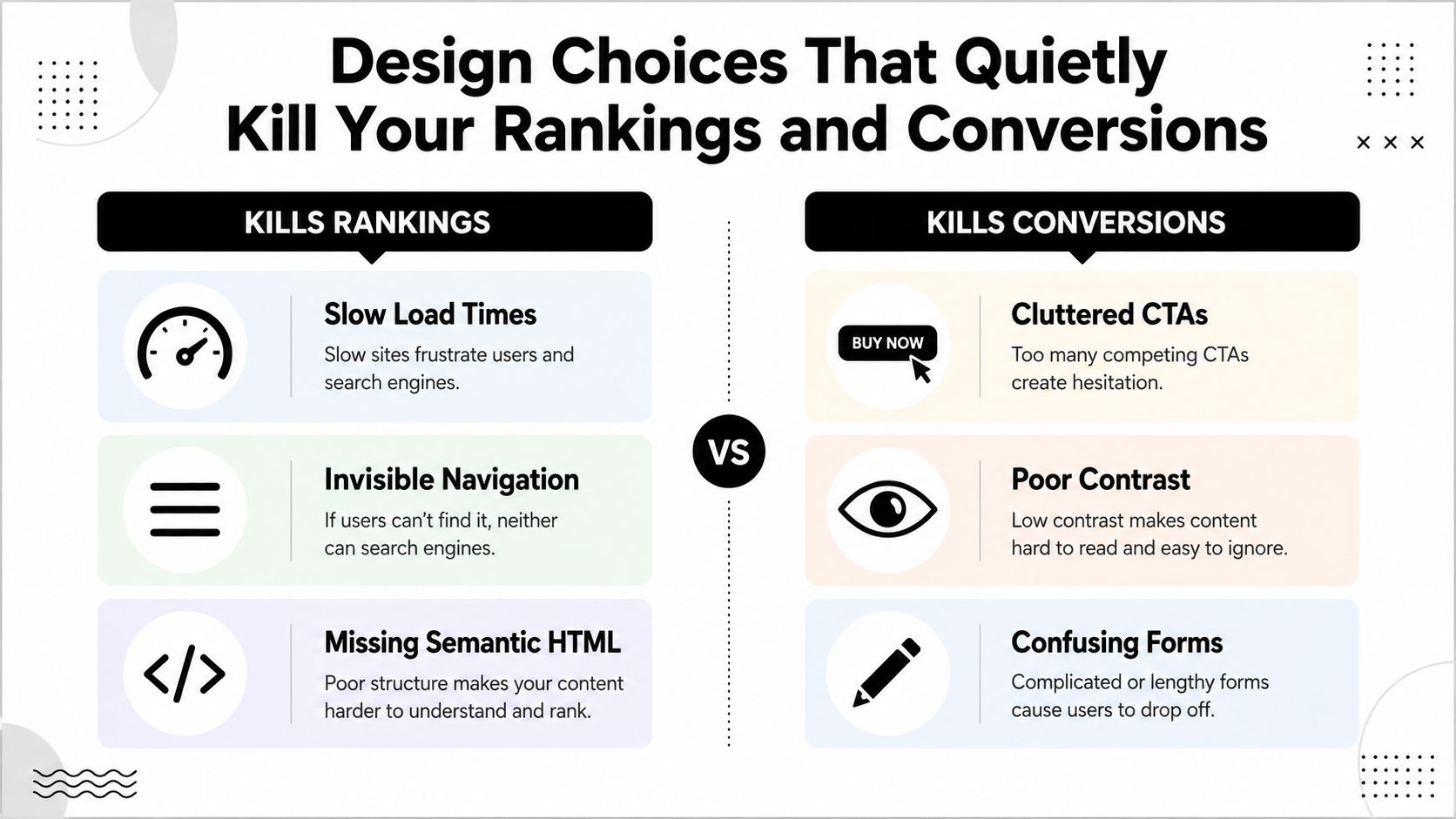
The visual decisions that create commercial drag
Oversized hero video: A large background video can delay the useful content and distract from the offer. Use motion only when it clarifies the service or reinforces the brand.
Hidden navigation: Hamburger menus on desktop, vague labels and hover-only interactions make important service pages harder to reach and harder to understand.
Generic stock imagery: A suited professional shaking hands doesn't prove that your firm understands a complex legal, financial or property decision. Show the team, process, work or environment where appropriate.
Buried contact details: If the visitor has to reach the footer to find a phone number or booking option, the page is making them work for the next step.
Stacked pop-ups: A newsletter prompt, chatbot, cookie panel and exit-intent offer can interrupt a visitor who was already ready to enquire.
Your design team should also validate how the page renders without relying on a browser executing every script. JavaScript-rendered content can create indexability problems when search engines can't reliably access or interpret the important copy, links or calls to action. Server-rendered or progressively enhanced content is usually a safer foundation for key service information.
Mobile is not a scaled desktop
Treating mobile as an afterthought produces cramped forms, oversized headings, awkward sticky bars and buttons that compete with one another. It also hides the exact friction that matters most to service businesses, because founders often review the site on a large monitor while prospects arrive through a phone.
Run the complete journey on a real mobile device. Search for a service, open the relevant page, read the first screen, find proof, select a call to action, complete the form and reach the confirmation page. If any step feels confusing, fix the flow before adding another blog post or plugin.
For a practical perspective on how brand decisions affect the interface, see Raffine Studio's guide to branding and web design.
A useful review should ask two separate questions:
Can search systems discover and interpret the page?
Can a qualified visitor act without hesitation?
If the answer to either question is no, visual polish won't rescue the result.
The Five Layers of a Site Built for Search and Sales
A site that generates booked discovery calls needs five connected layers. Review them as one system. A clear service page cannot compensate for a broken form, and strong schema cannot rescue an unclear offer.
1. Information architecture
Start with the journeys that produce revenue. Build the hierarchy around core services, audience needs and locations where local relevance matters. A buyers agency might separate investor services, owner-occupier purchasing and suburb expertise. An accounting firm may need distinct paths for business advisory, tax planning and compliance.
Use descriptive URLs, useful page titles and internal links that explain relationships between pages. Keep the homepage focused. Give each commercially meaningful service its own page, then make the route to a booking confirmation obvious for a qualified visitor arriving from Google, ChatGPT or Perplexity.
2. Front-end performance
Improve the rendered experience, not just technical scores. Compress images, reduce script dependencies, prevent layout shifts and remove components that do not help visitors understand the offer or take action. As noted in the earlier performance discussion, mobile traffic represents a large share of visits, so image weight and unnecessary scripts directly affect the path to a booking.
Check the complete journey with PageSpeed Insights, Lighthouse and Search Console, then test it on a real phone. A fast homepage does not compensate for a slow booking widget, a form that breaks at a responsive breakpoint or a confirmation page that never loads.
3. Structured data and entity signals
Schema gives search engines and answer engines clearer information about the page and the business. Use suitable structured data for the organisation, local business, service, person, article and FAQ content when it matches information visible on the page.
Keep the business name, address, phone details, service areas and profile references consistent across important platforms. Entity clarity matters because a system must connect the service, location, people and business before it can confidently interpret or recommend the page.
4. Trust and proof
A service page needs evidence that supports the buying decision. Add relevant credentials, identifiable team members, process detail, reviews, project evidence and clear expectations. Put proof beside the claim it supports instead of hiding every trust signal on a separate page.
A medical practice should make practitioner expertise and appointment information easy to verify. A construction company should connect project evidence to the type of work it wants next. Specific proof reduces hesitation and gives visitors a reason to choose the booking action.
5. Booking flow
Design the route to confirmation before adding decorative sections. A qualified visitor should be able to move from a relevant landing page to booking confirmation in three clicks or less, while the form collects the information your team needs.
Design layer | Primary outcome | Quick check |
|---|---|---|
Information architecture | Relevant discovery and orientation | Can a visitor reach the right service without guessing? |
Front-end performance | Fast, stable interaction | Does the mobile booking path load and respond cleanly? |
Structured data and entities | Clear machine interpretation | Are services, people, locations and business details unambiguous? |
Trust and proof | Confidence to proceed | Can a prospect verify competence before contacting you? |
Booking flow | Confirmed commercial action | Is the next step obvious, proportionate and easy to complete? |
Lead handling belongs inside this final layer. Enquiries contacted within 5 minutes are 100 times more likely to convert, while conversion retention falls to 60% after 1 hour and 20% after 4 or more hours. The lead-response benchmark from Apparate shows why the form and the follow-up process must be designed together. A well-built booking path still loses value when nobody responds promptly.
SEO-First Redesign vs Conversion-First Redesign
An SEO-first redesign usually begins with rankings. The team audits keywords, expands page depth, repairs metadata and creates internal links. That can improve discoverability, but the finished page may still bury the offer beneath generic content, weak proof and a vague enquiry button.
A conversion-first redesign starts with the decision. It clarifies the offer, removes friction, strengthens proof and makes the booking action visible. The risk is that the team may simplify too aggressively, leaving thin service pages, poor internal linking or insufficient context for search engines and AI assistants.
Approach | What it prioritises | Where it breaks |
|---|---|---|
SEO-first | Crawlability, topical coverage, rankings and organic entry points | It can produce pages that attract attention without creating confidence or action |
Conversion-first | Offer clarity, proof, calls to action and reduced friction | It can remove the content and structure needed for discovery |
Integrated | Search intent, page architecture, trust and booking | It requires strategy across design, content, development and follow-up |
The correct answer isn't to choose one side. Build the page architecture around the booking decision, then engineer search visibility into that architecture from the beginning.
That means the service page should open with the problem and audience, explain the relevant offer, provide proof, answer objections and present a direct action. The content should be crawlable and clearly organised. Schema should describe what the page already says. Internal links should help both visitors and search systems understand the relationship between services, locations, expertise and supporting content.
Don't approve a redesign because it has more copy or a cleaner homepage. Ask for the intended search entry points, the conversion path for each audience, the events that will be measured and the process for preserving valuable URLs and redirects.
This practical guide to website redesign for SEO is useful when a visual rebuild also needs to protect organic visibility.
Your agency should be able to show the whole journey, from query to landing page, from landing page to booking, and from booking to follow-up. If the proposal stops at launch, it's incomplete.
Designing for AI Search and Answer Engines
Google remains central, but service businesses now need pages that can be understood and selected by ChatGPT, Gemini and Perplexity. These systems often summarise information rather than returning a list of links, so a page needs to be easy to interpret, quote and connect to a real entity.
Australian coverage of AI search highlights a significant gap. One AU guide reports that only 12% of URLs cited by ChatGPT, Gemini and Copilot also rank in Google's top 10 for the same query, suggesting that traditional rankings alone don't guarantee inclusion in generated answers. The Australian discussion of AI SEO and GEO supports a different content priority, extractability, trust and entity clarity.
Make the page easy to quote
Place a concise answer near the top of the relevant page. State what the business does, who it helps, where it operates and what the visitor should do next. Follow that answer with supporting detail rather than forcing an assistant to assemble the meaning from scattered marketing phrases.
Use a logical heading hierarchy, descriptive service names and short sections that answer specific questions. Add FAQ schema only when the questions and answers are visible on the page. Mark up the organisation, people, services and locations accurately, and maintain consistent business information across your website and important external profiles.
Connect visibility to action
AI visibility isn't commercially useful if it sends a prospect to a page with no clear next step. Every citation-ready service page should include a direct action, relevant proof and a booking route that works on mobile.
Track more than rankings. Australian guidance recommends measuring AI visibility through citations, mentions, referral traffic, branded search lift and conversions, alongside data from Google Search Console, Bing Webmaster Tools and Google Business Profile. This AI search visibility checklist for Australian businesses provides the measurement direction.
Google's AI Overviews have also been reported to correlate with a 34.5% drop in click-through rate for top organic positions, with some sites experiencing 20% to 60% traffic declines. The Australian analysis of AI Overviews and SEO shows why the commercial response can't be “publish more keywords”. When fewer people click traditional results, the pages that earn attention need stronger relevance, authority and conversion design.
For a deeper treatment of the shift, read Raffine Studio's article on Generative Engine Optimisation-matters).
A Founder Diagnostic You Can Run This Week
You don't need to wait for a quarterly agency report. Run the journey yourself, record what happens and separate technical symptoms from commercial leaks.

Check discovery
Search your core service with the locations and client types you want. Repeat the exercise in ChatGPT, Gemini and Perplexity. Record whether your business appears, whether the result describes your service accurately and whether the linked page matches the query.
Pass: Your business or a credible page appears with a relevant description and a clear next step.
Fail: You're absent, misclassified or represented by an outdated page.
Test the mobile journey
Open the main landing page on a mobile device using a normal connection. Time how long it takes before the useful content is readable, then continue through the form or calendar.
Google and Think with Google research cited by an Australian CRO source reports that a one-second delay in mobile load time can reduce conversions by up to 20%. The Australian conversion benchmark discussion gives the relevant performance context.
Pass: The offer, proof and action are visible without fighting the interface.
Fail: The page jumps, blocks interaction or makes the visitor pinch, zoom and hunt.
Count the clicks
Start on the page a prospect is most likely to enter through. Count every step to a booking confirmation, including opening menus, selecting services and completing qualification fields.
Pass: The route is direct, the purpose of each step is obvious and the confirmation explains what happens next.
Fail: The visitor reaches a generic contact page, faces unnecessary fields or receives no clear confirmation.
Inspect the handoff
Submit a test enquiry during a normal business period. Check the acknowledgement, CRM record, notification, calendar handling and human follow-up.
Pass: The lead is acknowledged, assigned and followed up through a defined process.
Fail: The enquiry sits in an inbox or nobody knows who owns the next response.
Compare against competitors
Test three competitor sites using the same service query. Compare opening messages, proof, navigation, form length, mobile experience and booking clarity.
A useful audit doesn't ask which site looks nicest. It asks which site makes the buyer's next decision easiest.
What to Fix First and Who to Bring In
Fix the commercial leak before chasing another visibility gain.
Repair the booking flow and lead response. Make the action obvious, reduce unnecessary fields and automate acknowledgement and routing.
Improve mobile performance and interaction. Remove heavy assets, stabilise the layout and test the complete journey.
Strengthen service content, internal links and schema. Make each page useful for a defined audience and search intent.
Build AI search visibility. Clarify entities, authorship, authority signals and citation-ready answers, then measure mentions and conversions.
The partner you choose should understand strategy, copy, design, development, SEO and follow-up as one system. Be wary of proposals that promise rankings without discussing booked calls, or beautiful layouts without explaining crawlability, analytics and lead ownership.
If traffic looks healthy but enquiries don't, book a 30-minute site review and bring your analytics, highest-entry pages and complete booking flow. You'll get a clearer decision about what to fix first, rather than another list of disconnected recommendations.
Raffine Studio builds conversion-focused websites, SEO and AI search visibility systems that connect discovery to booked calls and lead follow-up. Visit Raffine Studio to review how your website can turn qualified search traffic into a more reliable enquiry pipeline.