online booking system, appointment scheduling, lead generation, business automation, service business website
What Is Online Booking System
by raffiné studio

An online booking system is software that lets clients self-schedule appointments, consultations, or services through your website. In Australia, the online travel bookings industry was valued at $2.1 billion in 2026, showing that digital booking is now a commercial infrastructure layer, not just a calendar feature.
A prospective client visits your website after searching for a lawyer, accountant, buyer's agent, broker, consultant or healthcare provider. They're interested, but they don't want to send an email and wait for a reply. If the next step is unclear, they may leave. If they have to exchange messages to find a suitable time, they may choose a competitor who makes the process easier.
That gap between interest and action is where an online booking system earns its place. It turns a website visit into a scheduled appointment, captures useful information before the conversation, sends confirmations and reminders, and gives your team a clearer path from enquiry to follow-up.
The right system won't replace a thoughtful sales process. It will remove avoidable friction from it.
Your Booking System Is More Than Just a Calendar
Manual scheduling creates a familiar pattern. A prospect calls while your team is in a meeting, leaves a message, waits for a response, and then exchanges emails to find a suitable time. Someone on your team checks calendars, confirms availability, enters the appointment, and remembers to send a reminder.
Every handover introduces risk. The wrong time zone, an outdated calendar, a missed email or an appointment entered twice can damage the client experience before the first conversation starts.
An online booking system puts that process in a controlled digital flow. It publishes approved availability, lets a client select a service and time, collects relevant details, confirms the appointment, and updates the business calendar. Depending on the system and the business model, it can also process payments, support rescheduling, send reminders and pass contact data into a CRM.
That makes it different from a shared calendar. A calendar records time. A booking system helps convert demand into an organised commercial action.
Practical rule: Treat the booking page as part of your sales journey, not as an isolated software screen.
The distinction matters for professional service firms. A buyer's agent might need to understand a client's location, budget and buying timeframe before a discovery call. An accountant may need to know whether the enquiry concerns tax, business structure or financial reporting. A law firm may need an initial matter category and a conflict-check process before allocating a consultation.
Your booking flow should collect enough information to prepare the team, but not so much that a prospect abandons it. That balance belongs in the website strategy, alongside messaging, calls to action and page structure. A conversion-focused website design approach treats booking as the next logical step after a visitor understands your offer.
The market context supports this shift. IBISWorld's Australian online travel bookings data valued the industry at $2.1 billion in 2026, with 29 businesses operating in the segment and market growth of 3.7% that year. The point isn't that every service firm should operate like a travel marketplace. It's that customers now recognise digital reservation as a normal way to access services.
The Core Components of a Booking Engine
A useful booking system has four commercial functions. Thinking about those functions is more valuable than comparing long feature lists, because it shows where the system creates or loses value.
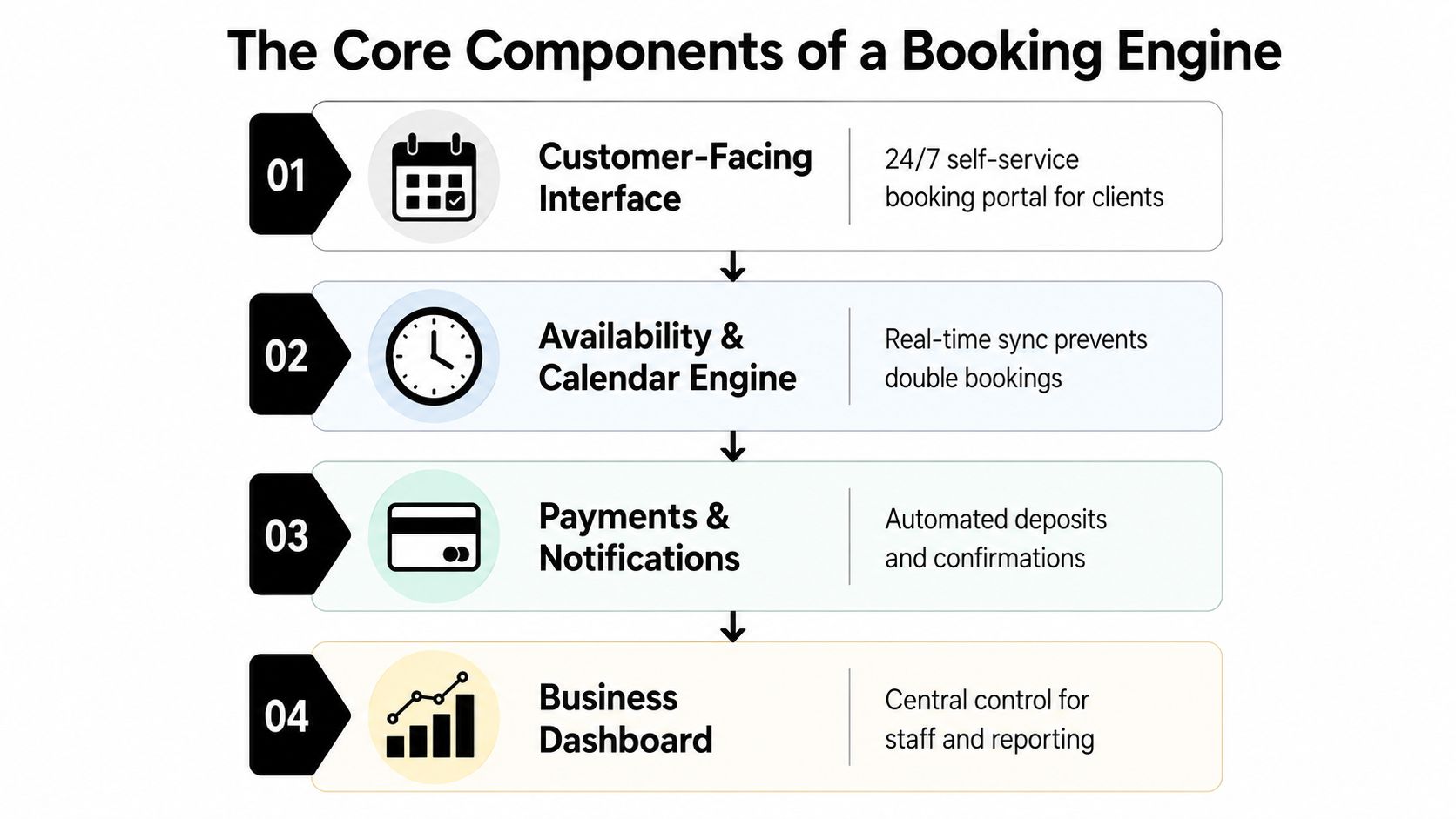
The customer-facing interface
This is the shopfront for your time. It may appear as an embedded booking widget on your website, a dedicated booking page or a link shared from email and social media.
The interface needs to answer practical questions quickly:
What can I book? Name the consultation, appointment or service in language the client understands.
Who is it for? Explain the appropriate use case and any requirements.
When is it available? Show genuine availability rather than asking the client to nominate a preferred time.
What happens next? Set expectations about confirmation, preparation and follow-up.
A polished interface can still perform badly if it asks for unnecessary information, hides the call to action or works poorly on mobile. The client should feel that they're booking a defined next step, not filling out an administrative form.
The availability and calendar engine
This is the logic behind the visible time slots. It manages working hours, staff availability, service duration, buffer periods, leave, capacity and calendar conflicts.
For a firm with several consultants, the rules may be more complex than “show an empty hour”. A consultation might require a particular team member, a room, a preliminary form or a minimum notice period. The engine must reflect those rules accurately.
Real-time inventory can make a material difference. Healthdirect Australia reported that, as at 30 June 2022, 6,510 vaccination clinics, or 65% of clinics listed on the Vaccine Clinic Finder, offered real-time online appointment booking. That figure had risen from 2,150 earlier in the financial year, a 203% increase, according to Capterra Australia's reservations software reference. The broader lesson is that live availability exposes capacity more effectively than static request forms.
The communications hub
Confirmation emails, calendar invitations, reminders and rescheduling instructions keep the appointment alive after the client books. These messages should be useful, not merely automatic.
A professional firm might include a preparation checklist, office location, video-call details, documents to bring or a clear cancellation process. For recurring services, the system may support repeat bookings and scheduled reminders.
Australian booking platforms commonly include SMS reminders costing as little as $0.06 per message, recurring bookings, reporting and staff-resource views, as described by TakeMyBookings. The right choice depends on the value of the appointment and the communication preferences of your clients.
The data and integration layer
The final component connects booking activity to the rest of the business. It may link with Google Calendar, payment tools, email platforms, CRM software, reporting systems or internal workflows.
Without this layer, the booking system remains a separate island. With it, a new appointment can create a contact record, notify the assigned team member, trigger a preparation email and provide a source for conversion reporting.
The Commercial Case for Automated Booking
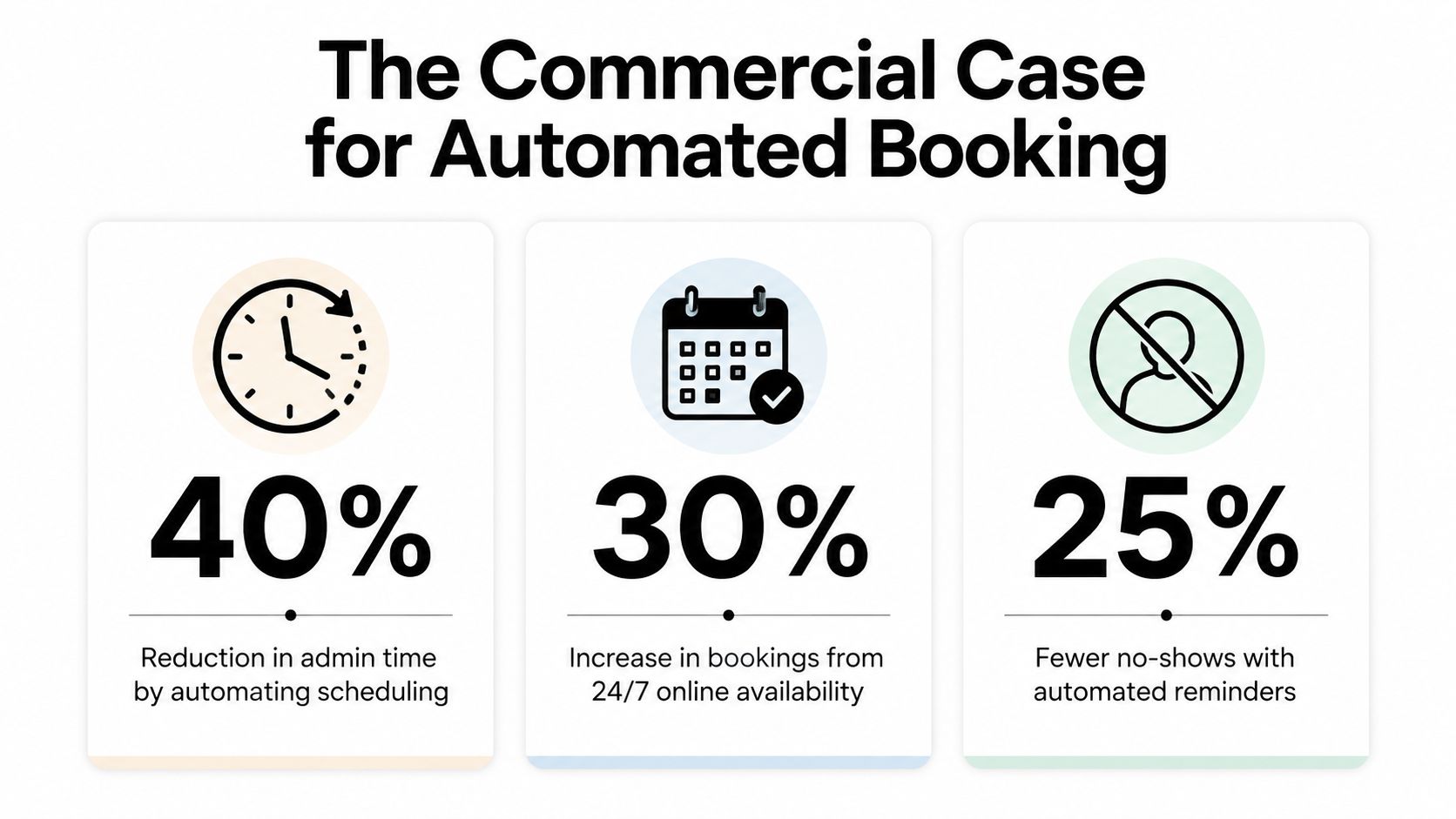
A booking system creates value in three places: it captures demand when staff aren't available, reduces repetitive administration and gives prospects a more decisive path to action.
The first benefit is availability. A website can receive visitors at any time, while your team may be handling client work, travelling between meetings or offline for the day. If the only next step is “call us”, the business depends on the prospect having the time and motivation to make contact during your operating hours.
Square's Australian appointments data shows that 39% of appointments are booked between 6pm and 10am, according to the Australian bookings information published by SumUp. That's a substantial period in which staff may not be answering phones or monitoring inboxes. A booking system allows the website to keep converting interest during those periods.
Less administration, better use of staff time
Manual scheduling is expensive even when nobody sends an invoice for it. A team member still has to monitor requests, identify suitable availability, reply, update records and chase confirmations.
Automation shifts those tasks into defined rules. Staff can spend more time preparing for qualified conversations, serving current clients and following up on opportunities that need judgement rather than calendar coordination.
The system also creates consistency. Every client sees the same available services, the same booking questions and the same confirmation process. That reduces the variation that appears when several staff members manage appointments differently.
A clearer conversion path
A booking action is more valuable than a vague contact action because it creates a defined next event. The prospect has selected a time, supplied information and received a confirmation. Your team knows what should happen next.
That's why booking belongs in a broader lead-generation funnel. A visitor may arrive through Google, a referral, a social post or an AI search result. The website should explain the offer, address objections and present booking as a logical next step, rather than hiding it in the footer or a generic contact page.
The embedded video below provides another way to think about how a booking flow can support the wider commercial journey.
Reminders and preparation messages also give the business a chance to improve the quality of the appointment. A prospect can receive the right information before the call, while your team can review the submitted context instead of starting with no background.
The return isn't only about filling more times. It's about making each booked conversation easier to manage, more relevant and more likely to progress.
What Most Businesses Get Wrong with Booking Systems
The most common mistake is installing booking software without redesigning the journey around it. The business adds a “Book now” button, sends visitors to a generic scheduling page and assumes the software will solve conversion problems by itself.
It won't.
A booking page can't compensate for unclear positioning, weak service descriptions or a call to action that appears before the visitor understands why they should speak with you. A professional services website still needs to establish relevance and trust. The booking system should then make the next step easy.
The booking experience feels bolted on
Many businesses send prospects away from the main website to a page with unfamiliar branding, limited context and a long list of appointment types. That interruption creates doubt. The prospect may wonder whether they've reached the right place, whether the appointment is suitable or whether they're committing to something they don't understand.
A stronger flow keeps the surrounding context visible. It explains who the call is for, what will be discussed, how long it will take and what the client should prepare. The booking tool should look and feel like a natural part of the website.
The form asks for too much
Qualification matters, but excessive questioning creates friction. A first booking should collect the information your team needs to prepare and route the appointment. It shouldn't attempt to replicate a full client onboarding process.
Use progressive information gathering where appropriate. Ask a small number of relevant questions at booking, then collect more detail through a confirmation email or follow-up workflow.
The best booking form is not the longest one. It's the one that gives the team enough context to act without making a good prospect work too hard.
The system isn't connected to follow-up
A booking confirmation alone isn't a client acquisition system. If the appointment sits in a calendar while the contact record remains in an inbox, your team loses useful context and reporting becomes difficult.
The business should know where the booking came from, what service the prospect selected, who owns the next action and what happens if the person cancels or doesn't attend. Without those connections, staff return to manual work around an automated calendar.
The team doesn't test the journey
Owners often test whether they can create an appointment. They don't always test the experience from a mobile device, the cancellation path, the confirmation email, staff notifications or the CRM handoff.
Run the process as a prospect would. Start at the service page, choose an appointment, submit the form, check every message and verify that the internal record is correct. A booking system is part of the client experience, so it needs the same attention as any other conversion page.
Integrating Your Booking System for Maximum Impact
The strongest setup connects four stages: website, booking system, CRM and follow-up. Each stage has a different job, and the handoff between them determines whether the business gains a reliable pipeline or a more attractive calendar.
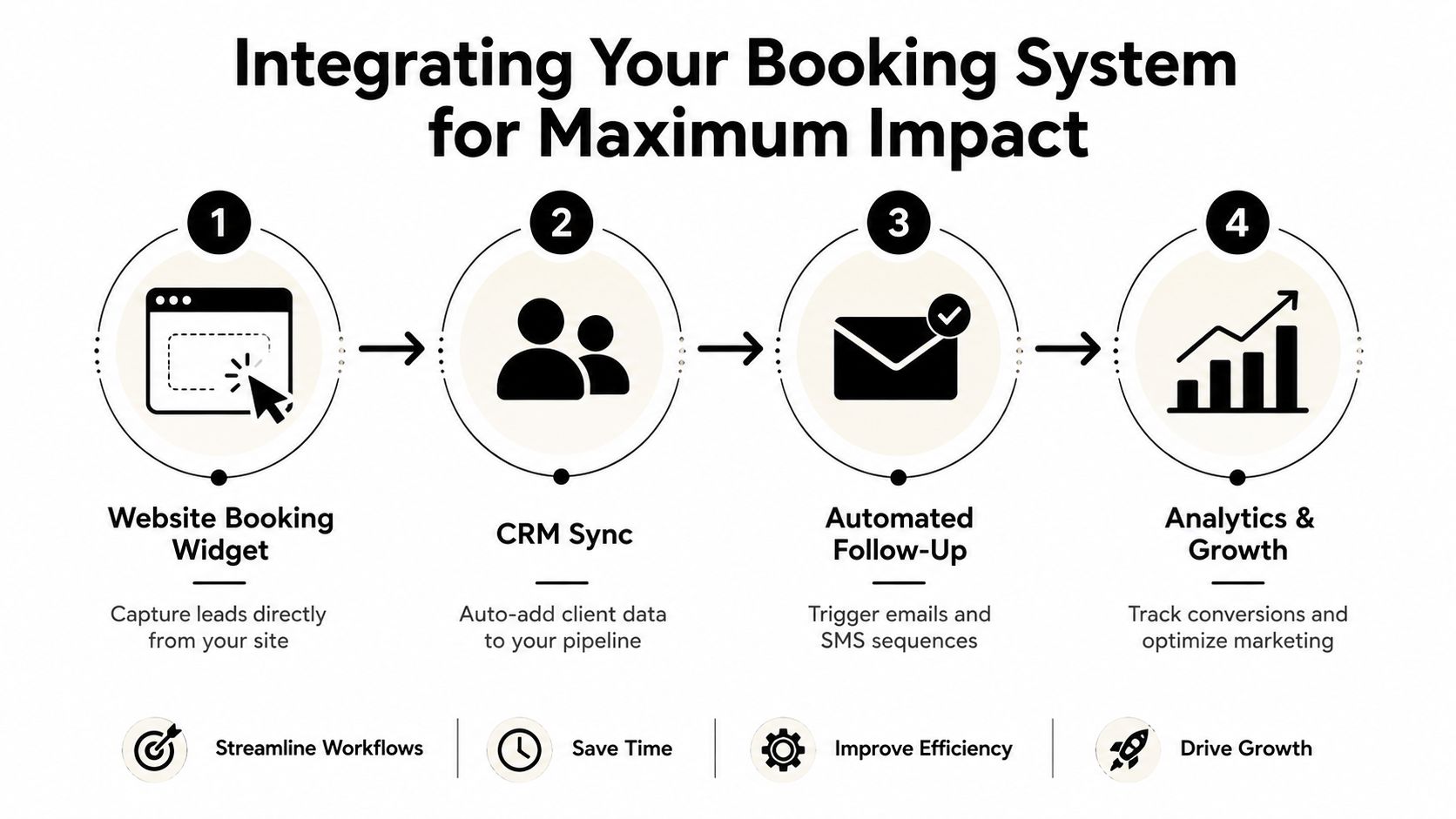
Start with the website
The website creates the reason to book. It should clarify the problem you solve, identify the right audience and answer the questions that prevent action.
For a buyers agency, that may mean explaining the buying process and who benefits from representation. For a broker, it may mean distinguishing between home lending, investment lending and refinancing. For a law firm, it may mean directing different matters to the right consultation type.
Place the booking action where intent is strongest. That might be after a service explanation, beside a high-value case example or at the end of a page that addresses common objections. Don't make every visitor book immediately. Give lower-intent visitors a useful way to continue learning, while making the next action obvious for people who are ready.
Pass the right data into the CRM
When someone books, the CRM should receive more than a name and an email address. Where the system supports it, pass through the selected service, appointment time, form responses, assigned team member and source information.
That record lets the business segment conversations and prepare properly. A financial firm can route an enquiry to the right specialist. A medical practice can manage the appropriate appointment category. A B2B consultancy can separate an initial discovery call from an existing-client meeting.
Trigger useful follow-up
Automation should respond to the client's situation. A confirmation message can explain what happens next. A reminder can include preparation requirements. A cancellation can create a task for personal follow-up. A completed meeting can trigger a next-step email or move the opportunity to a new pipeline stage.
The system shouldn't send identical messages to every person. Relevance matters more than volume, especially in professional services where the client may be sharing sensitive or commercially significant information.
Examples of automated business systems show how calendar booking, reminders and scheduling tools can form part of a wider operational workflow rather than operate as separate utilities.
Measure the journey
Track the path from source to booked appointment and from booked appointment to meaningful business outcome. Useful questions include:
Traffic quality: Which pages and channels attract people who book?
Booking friction: Where do visitors abandon the process?
Operational fit: Which appointment types create avoidable staff work?
Pipeline quality: Which bookings become genuine opportunities?
Follow-up performance: Are cancelled, missed or completed appointments receiving the right next action?
Services Australia provides a useful example of the model operating in a complex environment. After a pilot in Hobart, online appointment bookings became available nationally across more than 300 service centres, and the government said more than 81,700 appointments had been booked online shortly after launch, as reported in this Australian online booking software reference. A private service firm doesn't need the same scale to benefit from the same principle: the booking layer works best when it connects access, information and operational handling.
How to Choose the Right System for Your Service Firm
Choose the system around the client journey and operating model, not the biggest feature list. A law firm, medical clinic, buyer's agency and consulting practice may all need bookings, but their scheduling rules, privacy requirements and qualification needs differ.
Start with the appointment itself. Ask:
What is being booked? A fixed consultation, a variable-length meeting, a class, a site visit or a recurring service?
Who must be available? One adviser, a specific specialist, several staff members or a physical resource?
What information is needed first? Keep the form focused on preparation and routing.
What happens after booking? Define confirmations, reminders, documents, payment, rescheduling and follow-up.
Which systems must connect? Check calendar, CRM, email, payment and reporting requirements before choosing a platform.
Prioritise the client experience
Test the booking flow on mobile and desktop. Look for plain service names, readable availability, clear time zones, concise questions and an obvious confirmation step.
Ask someone unfamiliar with the business to complete a test booking. If they need an explanation, the system or the surrounding website copy needs work.
Check operational rules
A simple appointment calendar may suit a solo consultant. A growing firm may need staff permissions, pooled availability, buffers between meetings, recurring bookings, payments, cancellation rules and reporting.
Don't pay for complexity you won't use, but don't force a basic tool to manage a scheduling model it can't represent. That usually produces manual workarounds and unreliable data.
Assess the commercial connection
The final test is whether the system supports acquisition. Can it sit naturally within your website? Can it pass booking details into your CRM? Can it distinguish a qualified discovery call from a general appointment? Can you see which pages and channels generate useful conversations?
A tool that handles scheduling but leaves lead qualification and follow-up manual may still save time, but it won't deliver the full commercial value of an integrated booking journey. Raffine Studio offers website, funnel, CRM and calendar integration for Australian service businesses that want their website to generate and organise qualified conversations.
If your current process depends on inboxes, spreadsheets and manual reminders, start by mapping the journey from first website visit to completed appointment. Then identify where prospects hesitate, where staff repeat work and where important information disappears. Raffine Studio can help you redesign that path, connect the booking system to your website and follow-up workflows, and turn more qualified interest into booked conversations. Visit Raffine Studio to review the approach and start a practical discussion.